Starting out with a sample from here, I wanted to build out some reusable libraries I could use with other projects if needed, but focus the focus of the libraries on a new application which can take advantage of Azure’s Media Services. I also learned a few things from my last application I built, and I want to incorporate those bits into the solution as well.
I love this dog!

Weekly Photo Challenge : Fleeting
In a few days, these aren’t going to be much… but for now, they’re fleeting.

From this to this…
Rode Black Beauty in this morning since the stormed moved out, a glorious ride for sure. We’ll still get a bit of rain in the afternoons, but nothing like yesterday.
From this…

to this…

Spinning Up Some Media Magic
I was looking over some old app designs I shelved last year, they needed some support from something like Windows Azure Media Services, but they weren’t baked last year; maybe the preview was out when I last looked, not sure. Recently, I’ve been toying with the idea of getting one of these applications stood up using WAMS now that they’re ready.
I used this chain of posts to get a small harness built and get an understanding of what this stuff does and how it works together to create assets, then encode and stream in various formats, or convert the formats. The sample code is a bit of a fire house, but the post(s) explain what’s going on with each chunk coming out of the fire-hose.
What I wanted to share is related to a post where I was fighting with a few assembly references and how they were mixed up and giving me a rash. I asked NuGet for the WAMS bits and here’s what installed:
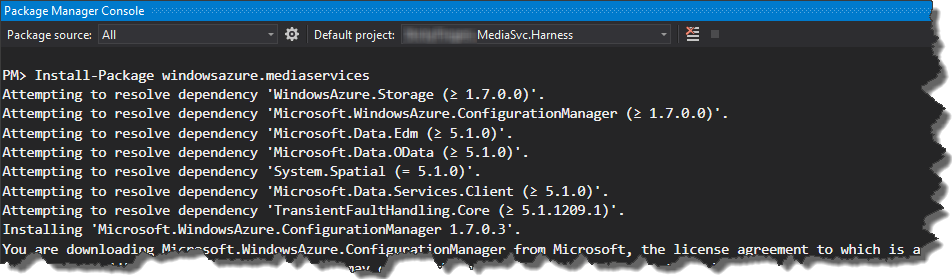
I remember using some of the 1.7 assemblies, but not the 5.1 assemblies; not a huge thing, but if the other project I was working on last week got mingled with this one, there might be some challenges.
The WAMS stuff looks fun, and its something new for me, I’ve not done much of this stuff except for using OS apps to convert media files from one format to another; so the curve may be steep starting out but yesterday I flattened it a bit and have a working harness that’s using my WA dev account.
HTH / oFc
A Word A Week Challenge – Metallic

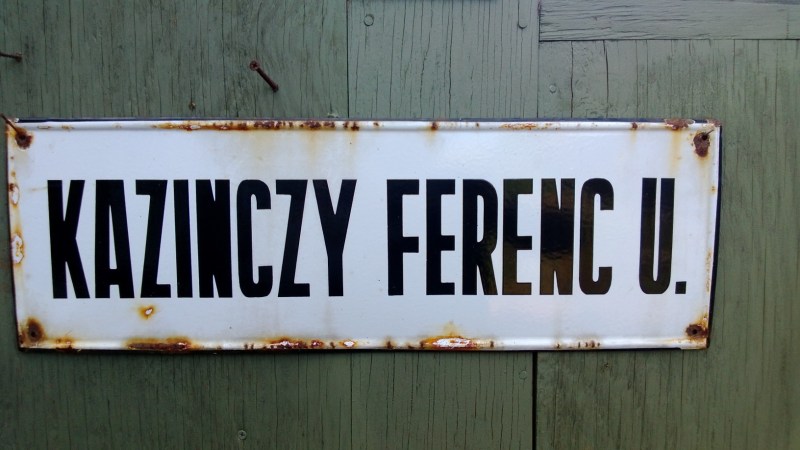
Weekly Photo Challenge: The Sign Says
Refactor and Review
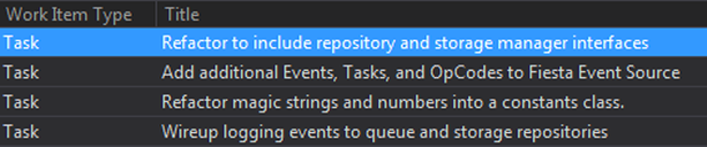
I’ve started to bring this “spike” to a close since I’ve set out to figure out the stuff I needed to using a few Azure services and got to a point of refactoring. When I get to this point with a spike, I set out to do the following things listed in the task list you see here. I’ll step through the why for each of them.
- Refactoring for Interfaces – I tend to build up a few concrete types which don’t need to be added to an IoC container for injection, I try not to abuse Unity even though it’s pretty awesome. Until I find out that maybe a member needs to be injected to reduce a bit of coupling across the solution. So, I’ll look for these opportunities across the solution and extract an interface and either add it to the container or do some poor man’s injection w/o the container – it just depends on the context of the type’s usage. I agree, more interfaces are better, even marker interfaces serve a purpose but I try not to go crazy with anything, interfaces included.
- Logging – At this point, I know more than I did a few weeks ago and I’ve got a clearer idea of what I want to log. This time I just need to build up the event source class for the app based on what I learned. That’s it. No more, no less.
- Magic Strings and Numbers – This one is special. I litter the application with strings and sometimes numbers and this is the best time to go back over the entire solution to pull them out and into something like constants, that’s what worked for this exercise. I’m walking through all of the code to see if it makes sense, especially the bits that I’ve not seen in a few weeks. I forget sometimes what I was thinking, and clarifying with a better member or method name is always better than adding comments. And yes, I’ve got a small battery of tests to fire off after each changeset gets checked in.
- Plumbing for cross-cutting stuff – Now that the logging events are done, I need to plant them in the classes that are doing the work.
Not much here, just some habits I’ve been using over the years to keep solutions clean, readable, and hopefully maintainable.
HTH / oFc
British Lunch
 My girlfriend’s nanny is so awesome when it comes to working with kids. She and her husband are from the UK and I thought it’d be a nice gesture to make her family a “British Lunch” this past Sunday. Her Dad and Mum are visiting from the UK as well and I thought I’d get some pretty good feedback from them on how well it turned out.
I found Jamie Oliver’s “Jamie’s Great Britain” cookbook (http://amzn.to/qFmHSo) and used that for inspiration and guidance. The measurement for each recipe are in American Standard which help with the metric conversions I thought I’d need to do. So, that gives the book a few stars to begin with.
The menu.
Empire Chicken, Superb Pork Loin, King of Mash : Irish Champ, Victoria Sponge, and Welsh Cakes
Everyone ate a lot, and although the desserts were chilled to keep them somewhat fresh, everyone appeared to enjoy the food and commented nicely. We finished up dessert with a nice tawny port, very delish!
I was really happy to do this for someone that gives so much on a daily basis, I’m looking forward to doing something like this again sometime soon too, maybe if it’s even to serve a Victoria Sponge moments after taking it out of the oven.
So much yum!
oFc
Azure SDK and SLAB
 Right before I skated out of the office to start my four-day Memorial Day weekend I jotted down a few notes to blog about which outlined what worked for me using the P&P Semantic Logging Application Block (SLAB), as well as a few other sticky points while I was trying to stand up couple Windows Azure roles.
It’s really easy to get tangled up with broken builds when you introduce an updated library/dependency into your projects. And going backwards a few minor versions just feels wrong when you want to “ship” with the something you want to stay current as long as possible. While NuGet was handy at keeping everything up to date, it did get in the way at times when I need to swap around a few bits. On a side note, the Package Manager CLI makes removing and adding things a whiz! I’m still a huge NuGet fan.
I started out with a 4.0 framework solution, then moved it to the 4.5 framework so I keep it at, or start at, 4.5. There was nothing wrong with 4.0 until I started adding the dependencies in. For example, the 2.0 Windows Azure (WA) Storage, Runtime, and Configuration bits I installed from the WA site (http://bit.ly/v5MF7m) install v2.0.5.1, and those assemblies ran on top of 4.0 just fine. This got me through the bulk of the coding to stand the application up.
Then in a previous post I mentioned I wanted to add in some logging pieces and wanted to give SLAB (http://bit.ly/Vh3Umz) a go. The sample code didn’t work with what I had on my box for some reason, which gave me a clue I might have some depedency issues coming at me with my code. The P&P code was easy enough to read through but the namespaces had a few changes at RTW time that I needed to work around, and was expected.
In addition to this, I had to work around issues between WindowsAzure.Storage and the MS.Data.Edm, MS.Data.OData, and System.Spatial assemblies. I started out satisfying the dependencies with using v5.0.2.0 for them, but *really* wanted to make the latest, v5.4, work, but most of the blog posts I read through confirmed v5.0.2.0 was the way to go. So the final fall back to get everything happy was to use v5.2 for the Edm, OData, and Spatial assemblies. Then I learned of the (v5.0.2.0) Edm, OData, and Spatial dependencies.
Inside the SLAB reference application, the console application project took a dependency on an earlier version of Edm, OData, and Spatial and I didn’t want to go that far back – stuff should just work, right? And it finally did. The logging pieces weren’t throwing anything, but they weren’t working. The table used to persist the logging entries wasn’t getting built (if it didn’t exist) inside local table storgae, so nothing was being logged.
The answer was to use the Edm, OData, and Spatial v5.2.0.0 assemblies. Bingo! Everything was firing, and all my tests were still passing so it was very green day once I got all of the zen sorted out in my assembly references.
Below is a list of assemblies with their dependencies sans the ones that come OOTB; hopefully this can help someone bumping into this as well.
HTH / oFc
WebRole (MVC4) Project
- Microsoft.Practices.EnterpriseLibrary.Common v6.0
- Microsoft.Practices.EnterpriseLibrary.Logging v6.0
- Microsoft.Practices.Unity v3.0
- Microsoft.Practices.Unity.Configuration v3.0
- Microsoft.WindowsAzure.Storage v2.0.0.0
- Microsoft.WindowsAzure.StorageClient v1.7.0.0
- Unity.MVC4 v.1.1.0.0
WorkRole Project
- Microsoft.Practices.Unity v3.0
- Microsoft.Practices.Unity.Configuration v3.0
- Microsoft.Data.Edm v5.2.0.0
- Microsoft.Data.OData v5.2.0.0
- System.Spacial v5.2.0.0
- Microsoft.ServiceBus v1.7
- Microsoft WindowsAzure.Configuration v1.8
- Microsoft WindowsAzure.Runtime v1.8
- Microsoft WindowsAzure.Storage v1.8
- Microsoft WindowsAzure.StorageClient v1.7
Infrastructure Project
- Microsoft.Practices.EnterpriseLibrary.SemanticLogging v1.0
- Microsoft.Practices.EnterpriseLibrary.SemanticLogging.WindowsAzure v1.0
- Microsoft.ServiceBus v1.7
- Microsoft WindowsAzure.Configuration v1.7
- Microsoft WindowsAzure.Runtime v1.7
- Microsoft WindowsAzure.Storage v1.7
- Microsoft.ServiceBus v1.7
 john@scale
You must be logged in to post a comment.