Wrapping my head around Windows Azure – Steel Threading Complete

image

I finished the Steel Thread late last week but didn’t get the blog post up over the long weekend.   What I came up with was just a few brief paragraphs on how it went (great) and what I learned (a lot).

The goal was to get used to using a worker role, a web(site) role, a table and queue for storage.

On the infrastructure side of things I realized that I needed specific types to store messages and the different formats they take on during processing.  One of the things I used to bootstrap was some guidance from the PnP team.  This post has more to do with using entities than it does with learning to use Windows Azure, but once you dive into Azure Table Storage, you’ll enjoy the ideas it presents.  There are more updated examples from the PnP team that employ some fabric stuff I’m targeting to use as well.

The guidance I used demonstrated some interesting abstractions around table storage, queues and their messages that I experimented with putting this together.  For this example I just wanted to to the following:

image

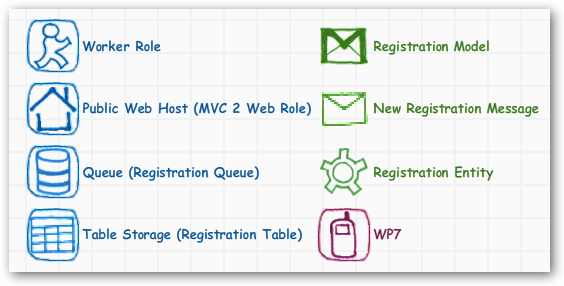
I wanted to submit a new registration into the application’s home page; create a Registration (model) object from the page; create a NewRegistrationMessage which is actually the message I putting on the queue.

That completes the first line of the diagram.  The second line of the diagram starts with the little blue guy running in a circle every few seconds, he’s the worker role.  The worker role tries to dequeue a message from the registration queue.  If the role find a queue message it turns it into a RegistryEntity which is a descendant of TableServiceEntity which I used to insert into the Registration Table, which is the one piece of table storage I need to use for this exercise.

This exercise help me figure out what extension methods I needed to write, and which pieces make the most sense to work together.  I could have skipped the queue implementation and just wrote directly to an azure table, but my first idea to store all of the messages first, then write to the queue.  For other types of messages and models (inventory inserts and updates)I probably will.  But for larger things which might need some moderation (most media types) I’ll probably push them onto a queue before bringing them into a staging area.

The little red wp7 phone is one of the clients that I want to access the data as well.  Last week I saw the WP7-Azure toolkit demo’d so I want to make that my next spike.  Yeah, spike.  I get that I can figure out all of the processing bits, but I want to make sure I get the phone bits right.

Here’s the stuff I’m going to keep from this exercise.  Some of it is directly copied from the PnP sample I mentioned; and some of it was just stuff that I wrote that I needed, not complicated, just code.
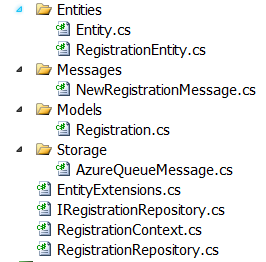
imageI have a class library called Data that has the following classes in it.  A couple of base types the MVC app uses; and the rest is used by Windows Azure.

Here are a few gists for the types I created, including the repository bits.

HTH.

Wrapping my head around Windows Azure – Steel Threading

I saw a LEAN webcast last year and learned about something creating a Steel Thread that can emulate what you want to application to do without any business logic.  This is a “throw your code away” exercise, so there’s no pressure, right?  Well sort of.  At this point we know very little about the problem, and less about how the solution will look. 

The idea here is to use what you do know based on customer interviews, and their ideas for success and turn that into something you can deploy in a day or two, but works.  Again, we’re not going to re-use any of this code since when we finish it will effectively be a hot mess of coupled and brittle code we wouldn’t want to keep around anyway, maybe we can call it an ‘ugly spike’.

Steel Threading supports the notion that you can start at point “A” and traverse 4, 8, 9, or (n) other points arriving at the destination in the state you expected – think “Chutes and Ladders”; you may or may not make it from one point to the next, but you’re learning as you go. 

The ultimate goal is to work inside the box and not prescribe something for the solution that doesn’t work or they can’t sustain.  It is a spike of sorts, but it helps kick off the project in a direction that makes sense today, tomorrow or next week might be totally different – we’ll worry about next week, next week.

The Initial Stories

I have 15 stories with high-to-medium level detail to start with. This isn’t going to be an Amazon or Zappos, but it will be something ecommerce in nature. Since most of the common scenarios have been solved by the industry we can take some fairly intelligent hints on how we like things to happen.  For example, don’t put a product in my shopping cart – and let me pay for it, if it’s been discontinued.  That said, I can focus on executing on my customers goals for this solution.

Where Azure Comes In

All that said, I’ve got an MVC web role, and a worker role in my (disposable) steel thread solution.  I can add more projects to the solution while I’m finishing this exercise if I need to, but this is the starting point right now.

Our local Orlando user group hosted Scott Densmore from the Microsoft PnP Team who discussed taking a stock ASP.NET project and wiring it to AppFabric’s Access Control services.  That’s what I need to do to support a few of my stories I’ve collected so far.

The web role will submit stuff that needs to be picked up and persisted, so I’m thinking about using a queue to intercept these submissions, then move the submission into table storage.  There’s already guidance around this in a few places so it should wire up quickly and work. The content types I’m concerned with have different rules on submission, so there may be a bit of a workflow involved with the submission that might it a bit prickly.

I’m going to run most of this from my local DevFabric, I’m not sure there’s a need to deploy it except for the fact of getting good/better at deployments.  Besides, deployment looks a bit involved to me at the moment, so getting a few deployments behind me will only help. 

On a side note, I was a bit jealous this morning reading about a VS2010 plug-in for Rackspace deployments – very cool stuff.  The case study was written up by Microsoft so I would only think they are working out the same types of features to keep us out of their management portal and inside the IDE – maybe a new project property tab based on the type of project template?  That would be cool.

The IDE

Here are my two development environments:

–  Both work and home are running the 64-bit Windows 7 Awesome SKU

– Both work and home have at least 4Gb of RAM (work has more)

– Both work and home have at least 2 cores (work has many more)

– Both are running SQL Server 2008 R2

– Azure 1.3 Toolkit

– VS2010 SP1

– GitHub for SCM, for now anyway

That’s it for now.

-ofc

Getting my head around Windows Azure, Preamble Ramble


azurethumb

I’ve become very intrigued with Azure lately and also an Azure idiot at the same time.  Well, maybe not a total idiot but it’s a huge platform.  I’ve been following some of the guidance from the MS PnP team to get my feet wet but recently I’ve just wanted to dive in.

The main idea for taking this approach is to just focus on one thing.  I’ve been a scatter-brained developer for the last few years and recently after coming off a long project, I just want to focus on one (albeit large) technology stack.  There’s one or two other things I’ll poke at but this is one that’s going to get a lot of my daytime focus.

So as to not get any readers tangled up in the who or what I’m building, I’ll be *very* generic in my descriptions of everything except the technology.  So hopefully some of this will be simple enough to use on your own projects, and help with the why, that’s the plan anyway.

Take your Queues from PnP

I received an email from our Scott Densmore earlier this week that pointed me to a GIT project which had some updates he was making to PnP Azure guidance.  Without pressing F5, I started my own code review on the solution to see how the code was laid out.  Here’s the post that discussed the changes, and here’s the GIT source he posted.

He mentioned a MultiEntity pattern he was plugging in based on another post.  Both posts was interesting, and made total sense to a Azure noob like me.  Hanselman is big on reading good code, and today I read some really good code.  How do I know?  I compared it to some Azure Boot Camp code that laid out a short talk on Azure Queues today, which is where I focused my review.  From there, I went back up the stack to the data services (Role, Member, Session) and dove into the decoupled plumbing code from there, then up to the ASP providers.

This discussion about queue processing, not the MultiEntity pattern, Scott nails that together, and if that doesn’t do it for you, check out the article Scott references in his post.

The interesting difference in from the boot camp code was how the worker role that managed the queues was working.  The PnP code had setup a Task to run the job at specific intervals with an object called QueueCommandHandler that handles the processing. Here was the difference.  The boot camp code looked at using while(true) to loop through the queues’ messages to process.  I will have to say, the boot camp webcast definitely helped me understand queue processing much-much better.  And I could read through the PnP code even more easily.

The generic command queue handler which the queue command handler derives from looks like this:

image

The queue command handler looks like this:

image

The command handler looks like this:

image


When the worker role starts, it handles task scheduling like this for queue and non-queue command processing:

image


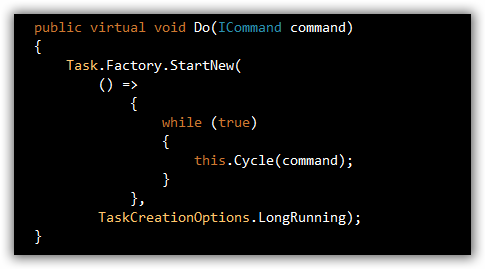
The Do() still uses a loop to process, but the processing is still pulled apart and re-usable a bit more to my liking.

image

The only thing I would to differently at first glance at all of this code was to incorporate some type of rheostat to handling slowing the processing if the queues are so busy. 

The boot camp web cast had an interesting approach to this called exponential back-off polling when means to us mortals is that if I look at queue every 5 seconds and it’s empty, I’m going to set an interval somewhere to 10 seconds so I check less often.

I’ve built things like this into some projects I’ve built, and usually from configuration, but this needs to be more dynamic (hands-free).  I’ll probably toy with this to build something easier to ready (which is why I’m not posting it here).

Take a look at Scott’s code and pick out some part of Azure that interests you as see if there any queues you want to take from their guidance.